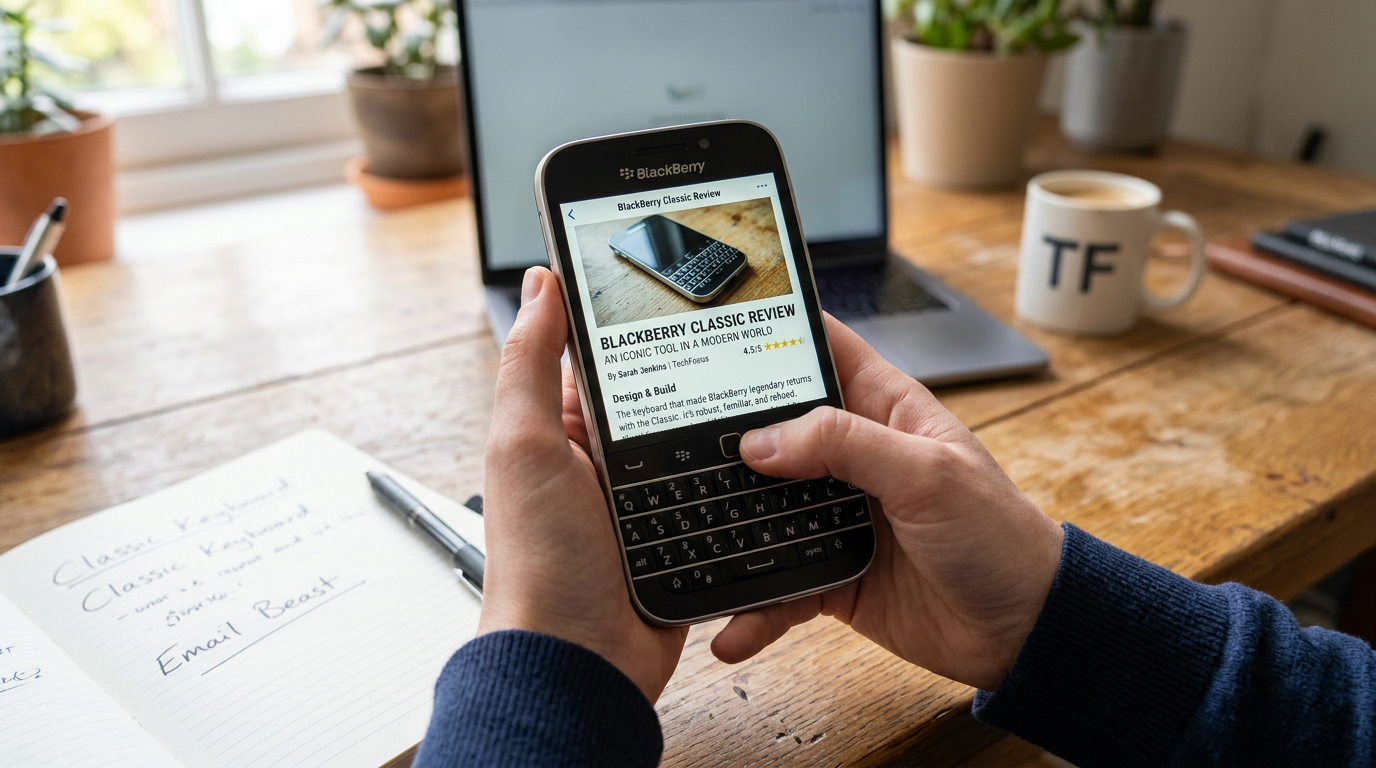
BlackBerry Classic Review: The Triumph & Nostalgia of Physical QWERTY
When BlackBerry released the BlackBerry Classic (internally designated as the Q20), it was a direct response to a passionate enterprise user base that demanded one specific thing: the return of the legendary utility belt. After experimenting with all-touch form factors like the Z10 and gesture-only QWERTY devices like the Q10, BlackBerry realized that true power communicators desperately missed the physical navigation keys—Call, End, Menu, Back—and the precision of an optical trackpad.
The BlackBerry Classic was engineered to capture the exact tactile magic of the iconic BlackBerry Bold 9900, while marrying it to the modern architecture of BlackBerry 10 OS (version 10.3.1). In this definitive BlackBerry Classic review, we dive deep into the hardware construction, keyboard acoustics, system throughput, real-world email productivity, and its growing modern appeal as a distraction-free digital detox tool.
Table of Contents
- 1. Hardware & Ergonomics: The 35-Key Physical QWERTY & Navigation Belt
- 2. Optical Trackpad Precision & Text Selection Mechanics
- 3. Display Engineering: The 1:1 Square Touchscreen Canvas
- 4. Software Architecture: BlackBerry 10 OS & The Unified Hub
- 5. Internal Specs: Qualcomm Snapdragon & System Throughput
- 6. Android APK Runtime: Possibilities & Limitations
- 7. Battery Endurance & Acoustic Construction
- 8. Modern Relevance: The Ultimate Digital Detox & Minimalist Phone
- 9. Complete Technical Specifications Matrix
- 10. Frequently Asked Questions (FAQs)
1. Hardware & Ergonomics: The 35-Key Physical QWERTY & Navigation Belt
At the center of the BlackBerry Classic experience sits what is arguably one of the finest physical mobile keyboards ever manufactured. Unlike flat touchscreens that force eyes down to confirm key strikes, the Classic’s 35-key physical QWERTY layout relies entirely on tactile muscle memory.
Each key features a sculpted, dome-shaped cap angled specifically to match the sweep of human thumbs. Stainless steel frets—thin metal bars—separate each row of keys. These frets prevent accidental key presses while providing structural rigidity across the lower chassis.
The Return of the Navigation Tool Belt
The headline feature of the Classic was the re-introduction of the classic navigation belt. Positioned directly above the QWERTY keyboard and below the screen, this strip includes five essential physical controls:
- Send (Green Key): Instantly opens the phone dialer or initiates a voice call from contacts or email threads.
- Menu Key: Opens context-sensitive options within any active application without searching for screen overlays.
- Optical Trackpad: A tiny, highly precise optical sensor for pixel-perfect cursor movement and text editing.
- Back Key: Step backward through app hierarchies or collapse open menus smoothly.
- End (Red Key): Terminates call connections instantly or returns to the home screen grid.
“For users editing long corporate emails or terminal scripts, the optical trackpad eliminated the frustration of tapping precise character spaces with broad fingertips on a glass screen.”
2. Optical Trackpad Precision & Text Selection Mechanics
Text manipulation on standard touchscreens remains an inherently imprecise process involving magnifying bubbles and finicky cursor handles. The optical trackpad on the BlackBerry Classic completely resolves this issue by bringing desktop-class cursor control to a handheld device.
Precision Selection Workflow
By holding down the Shift key on the physical keyboard and swiping a thumb over the optical trackpad, users can highlight text character-by-character or line-by-line with exact precision. Shortcuts like ALT + C (Copy) and ALT + V (Paste) operate instantly, turning the device into an exceptionally efficient document editor.
This cursor control makes scrolling through massive PDF documents, multi-page spreadsheets, and dense web pages effortless, without blocking the display screen with your fingers.
3. Display Engineering: The 1:1 Square Touchscreen Canvas
The BlackBerry Classic features a 3.5-inch square IPS LCD display with a resolution of 720 x 720 pixels, resulting in a pixel density of 294 ppi. Protected by Corning Gorilla Glass 3, the display delivers vibrant color accuracy and high contrast ratios.
The Ergonomics of a 1:1 Aspect Ratio
While widescreen 16:9 or 20:9 displays dominate modern smartphones for consumption of vertical feeds and widescreen video, a 1:1 square ratio excels for text consumption. Reading email bodies, document pages, and web articles requires far less vertical scrolling because line lengths fit naturally across the square canvas.
When combined with the physical keyboard occupying the bottom half of the phone, the entire 3.5-inch screen remains 100% visible at all times—unlike touchscreens where an software keyboard consumes over 50% of the display area when typing.
4. Software Architecture: BlackBerry 10 OS & The Unified Hub
At the heart of the BlackBerry Classic’s software experience is BlackBerry 10 OS (version 10.3.1). Built on the QNX real-time microkernel architecture—the same ultra-stable operating system foundation used in automotive telematics and nuclear plant control systems—BB10 was engineered for multi-tasking stability and security.
The BlackBerry Hub Advantage
The defining feature of BB10 is the BlackBerry Hub. Accessible from anywhere in the operating system via a simple “Peek” gesture (swiping up and right with the optical trackpad or touch screen), the Hub aggregates every communication stream into a single unified inbox:
| Communication Channel | Hub Integration Features |
|---|---|
| Corporate Email (Exchange/ActiveSync) | Full folder sync, flag prioritization, custom signature rules, out-of-office toggles. |
| SMS & MMS Text Messages | Inline thread replies without opening secondary messaging applications. |
| Phone Call Logs & Voicemail | Unified missed call notifications with one-touch redial shortcuts. |
| Calendar Invites | Direct calendar accept/decline actions straight from message headers. |
5. Internal Specs: Qualcomm Snapdragon & System Throughput
Under the hood, the BlackBerry Classic is powered by a dual-core Qualcomm Snapdragon S4 MSM8960 processor clocked at 1.5 GHz, paired with 2GB of LPDDR2 RAM and 16GB of internal flash storage (expandable up to 128GB via microSD slot).
Real-World OS Fluidity
While those processor specs appear modest by current mobile standards, the QNX microkernel framework manages RAM distribution exceptionally well. Navigating between active Active Frames (open apps), switching tasks in the Hub, and typing fast key sequences operates without input lag.
6. Android APK Runtime: Possibilities & Limitations
To address the app ecosystem gap, BlackBerry integrated an Android 4.3 Jelly Bean runtime engine directly into BlackBerry 10 OS. This allowed users to install and run Android applications via APK files or third-party storefronts like the Amazon Appstore.
App Compatibility Realities
While lightweight Android utilities, offline document viewers, and basic audio players run smoothly, apps relying heavily on Google Play Services (such as Google Maps or real-time banking apps requiring specific SafetyNet hardware checks) are limited or require patched APK modifications.
7. Battery Endurance & Acoustic Construction
The BlackBerry Classic packs a non-removable 2515 mAh lithium-ion battery. Given the compact 3.5-inch screen and the efficiency of the BB10 OS, power draw is significantly lower than on large widescreen smartphones.
All-Day Power Management
During testing under typical professional workloads—continuous push email over LTE, phone calls, calendar checks, and text messaging—the Classic comfortably lasts a full 14 to 18 hours, often stretching into a second day of light usage.
Acoustically, call quality on the BlackBerry Classic remains top-tier. Featuring dual noise-canceling microphones and proprietary Natural Sound technology, call audio adjusts in real-time based on ambient background noise levels.
8. Modern Relevance: The Ultimate Digital Detox & Minimalist Phone
In recent years, the BlackBerry Classic has experienced a major resurgence among enthusiasts, writers, and productivity-focused users seeking a digital detox device.
Because modern algorithmic social media apps either do not run on the legacy Android runtime or offer a clumsy experience on a 1:1 screen, the Classic naturally strips away digital distractions. It returns the mobile phone to its original intent: a high-efficiency tool for direct voice communication, secure text messaging, and focused email management.
9. Complete Technical Specifications Matrix
Detailed technical specifications breakdown for the BlackBerry Classic (Q20):
| Hardware Component | Technical Specification Detail |
|---|---|
| Form Factor | Physical QWERTY candybar with stainless steel frame |
| Display Size & Resolution | 3.5-inch IPS LCD, 720 x 720 pixels (294 ppi), 1:1 aspect ratio |
| Keyboard & Controls | 35-key backlit QWERTY, optical trackpad, Call, End, Menu, Back keys |
| Processor | Dual-Core Qualcomm Snapdragon S4 MSM8960 @ 1.5 GHz |
| System Memory (RAM) | 2GB LPDDR2 RAM |
| Internal Storage | 16GB, expandable up to 128GB via microSD card slot |
| Rear Camera | 8 MP autofocus with LED flash, 1080p video recording @ 30fps |
| Front Camera | 2 MP fixed-focus, 720p video recording |
| Battery Capacity | 2515 mAh non-removable Lithium-Ion |
| Cellular Bands | 4G LTE, 3G HSPA+, Quad-band GSM/EDGE |
| Physical Dimensions | 131 x 72.4 x 10.2 mm (5.16 x 2.85 x 0.40 inches) |
| Weight | 177 grams (6.24 ounces) |
10. Frequently Asked Questions (FAQs)
Yes, depending on your local carrier network support. The BlackBerry Classic operates as a standard 4G LTE GSM device for standard cellular voice calls and SMS text messaging, independent of legacy BlackBerry infrastructure servers.
Native BB10 applications are no longer supported. However, users can side-load lightweight third-party Android messaging clients or web-based alternatives using the built-in Android 4.3 runtime engine.
The Classic features a traditional 4-row curved keyboard with stainless steel frets and a physical navigation belt (trackpad, call buttons). The Passport features a much wider, 3-row straight keyboard with touch-capacitive gesture scrolling built into the keys themselves.
Its tactile physical QWERTY keyboard, secure email integration, 1:1 screen aspect ratio, and lack of modern addictive social media app compatibility make it an ideal device for professionals looking to minimize screen addiction while keeping essential communication channels open.