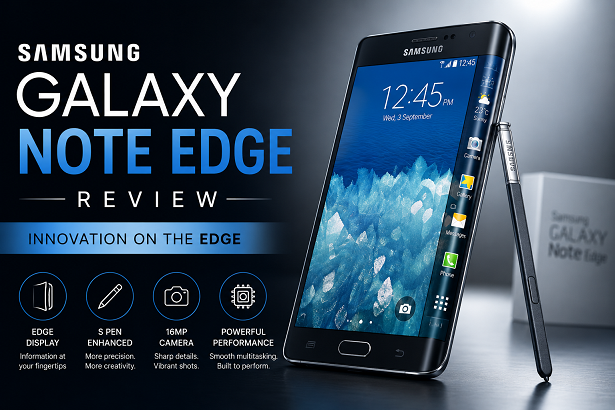
Samsung Galaxy Note Edge Review: The Pioneer of Curved Display Technology
When Samsung unveiled the Galaxy Note Edge alongside the Galaxy Note 4 at IFA Berlin, it delivered one of the most audacious hardware experiments in mobile computing history. Rather than following the conventional flat-slate form factor that dominated the market, Samsung introduced a Super AMOLED panel that sloped dramatically down the right side of the device. This single structural shift altered the landscape of smartphone manufacturing, paving the way for dual-curved edges, waterfall screens, and modern foldable panels.
In this comprehensive Samsung Galaxy Note Edge review, we explore the engineering achievements, software integrations, camera performance, and real-world ergonomics of a device that redefined mobile display design. From its 2.7GHz Snapdragon 805 processor to its 2,048-level pressure-sensitive S Pen, we dissect every element of this landmark smartphone to evaluate how its legacy holds up today.
The Edge Display: Engineering Breakthrough or Visual Gimmick?
The defining feature of the Note Edge is its 5.6-inch Quad HD+ Super AMOLED display. Standard Quad HD resolution sits at 2560 x 1440 pixels, but Samsung added a distinct 160-pixel wide vertical column along the right curvature, pushing the total resolution to 2560 x 1600 pixels. Covered by a custom piece of molded Corning Gorilla Glass 3, this curved section operated as a dedicated, secondary interface ribbon.
Under realistic viewing conditions, the OLED panel delivers vivid color reproduction, infinite contrast ratios, and crisp text rendered at approximately 524 pixels per inch (ppi). Samsung implemented software palm-rejection algorithms to prevent accidental input when holding the device, allowing users to wrap their hand around the right side without constantly launching unwanted shortcuts.
Key Functionalities of the Curved Panel:
- Replaced Launcher Docks: Users could house core application shortcuts on the side panel, keeping the main home screen clean and uncluttered.
- Contextual Application Controls: In media playback or photo-taking modes, playback controls and camera shutter buttons moved onto the edge strip, leaving the main 5.6-inch viewable area entirely unobstructed.
- Information Tickers & Night Clock: The curve operated independently as a low-power digital clock, sports scoreboard, financial ticker, or system notification center.
- Quick Access Tools: Swiping down revealed useful mini-utilities including a ruler, stopwatch, timer, flashlight switch, and voice recorder.
Design, Ergonomics, and Build Quality
Aesthetically, the Note Edge presents a unique profile. Its left edge features the chamfered aluminum framing introduced in the Note 4, while the right edge tapers smoothly downward as glass. Because the right spine was occupied by display glass, Samsung moved the power/lock key to the top edge of the chassis—a design adjustment that required a brief learning curve for users accustomed to side-mounted power keys.
The rear panel retains Samsung’s textured, faux-leather removable plastic cover, offering tactile grip and quick access to a swappable battery, micro-SIM slot, and dedicated microSD expansion card slot supporting up to 128GB of expandable storage. Measuring 151.3 x 82.4 x 8.3 mm and weighing 174 grams, the Note Edge is slightly wider than traditional phablets but feels balanced in the palm due to its lightweight construction.
Hardware Performance & Processing Power
Under the hood, the international variant of the Galaxy Note Edge is driven by the Qualcomm Snapdragon 805 System-on-Chip (APQ8084), featuring a 2.7 GHz quad-core Krait 450 CPU paired with an Adreno 420 GPU and 3GB of LPDDR3 RAM. Select regional editions, particularly in South Korea, featured Samsung’s octa-core Exynos 5433 processor.
During heavy multitasking across Multi-Window sessions, the Snapdragon 805 renders graphics smoothly and processes resource-intensive applications without overheating. The 3GB RAM capacity provides ample head-room for smooth background app retention and rapid context switching between the main workspace and the edge panel bar.
Technical Specifications Overview
To summarize its raw hardware capabilities, here is the full specification breakdown for the Samsung Galaxy Note Edge:
| Specification Metric | Hardware Feature Details |
|---|---|
| Display Panel | 5.6-inch Super AMOLED, 2560 x 1600 pixels (524 ppi), Gorilla Glass 3 |
| Processor (SoC) | Qualcomm Snapdragon 805 (Quad-core 2.7 GHz Krait 450) |
| Graphics Processing | Adreno 420 GPU |
| RAM & Storage | 3GB RAM; 32GB / 64GB onboard storage + microSD slot up to 128GB |
| Main Rear Camera | 16 MP (f/2.2, 31mm, OIS, 4K video recording @ 30fps) |
| Front Camera | 3.7 MP (f/1.9 aperture, 1440p video recording) |
| Battery Capacity | 3,000 mAh removable Li-ion (Quick Charge 2.0 supported) |
| Stylus Support | Integrated S Pen with 2,048 levels of pressure sensitivity |
S Pen Functionality: Elevating Productivity
As a core entry in the Note family, the Note Edge houses a fully integrated S Pen stylus. Upgraded to support 2,048 distinct pressure sensitivity levels, the stylus mimics the feel of pen on paper with remarkable fidelity. Removing the pen from its bottom slot automatically triggers the Air Command wheel, offering instant access to primary productivity features:
- Action Memo: Converts handwritten notes instantly into actionable digital data like phone numbers, contacts, or map destinations.
- Smart Select: Allows users to clip, crop, and collect custom content excerpts from web pages, images, or documents.
- Screen Write: Captures full-screen screenshots and permits immediate annotations or diagrams.
- S Note Suite: A versatile digital notebook app supporting vector drawing, text input, and multimedia attachments.
Camera Performance: Sharp 16MP Optics with OIS
The Galaxy Note Edge incorporates a 16-megapixel rear camera sensor with Optical Image Stabilization (OIS) and an f/2.2 lens aperture. Under daytime conditions, colors are rich and vibrant, while high dynamic range (HDR) processing balances shadow details and bright highlights cleanly. Optical stabilization counteracts minor hand tremors, yielding clear low-light shots and stable 4K video recording at 30 frames per second.
The front-facing 3.7-megapixel camera features an f/1.9 aperture for bright selfies and includes a Wide Selfie mode that stitches panoramic angles together to capture larger group photos seamlessly.
Battery Life and Power Management
Powering the display requires disciplined energy management. The Galaxy Note Edge uses a 3,000 mAh removable battery pack—slightly smaller than the 3,220 mAh cell in the flat Note 4. Under typical usage involving web browsing, messaging, media playback, and productivity tasks, the device delivers a full day of battery performance.
When battery levels run low, Qualcomm Quick Charge 2.0 allows the device to charge from 0 to 50 percent in roughly 30 minutes using the included fast charger. Additionally, Ultra Power Saving Mode converts the interface to a monochrome theme, restricting non-essential background processes to preserve standby battery power for emergency communication.
Software Experience: TouchWiz Meets Android KitKat
Launching initially on Android 4.4.4 KitKat before receiving official software updates to Android 5.0 Lollipop and Android 6.0.1 Marshmallow, the software experience is deeply integrated with Samsung’s TouchWiz skin. Special software features include Multi-Window multitasking, one-handed operation modes, and custom edge panel management menus where users can download additional edge widgets directly from the Galaxy App Store.
The Enduring Legacy of the Note Edge
Looking back at mobile phone design history, the Galaxy Note Edge stands out as an iconic inflection point. It demonstrated that flexible AMOLED displays could be mass-produced at scale, setting the stage for subsequent classics like the Galaxy S6 Edge, S7 Edge, and eventually today’s foldable Galaxy Z Series. It remains an unforgettable, collectible masterpiece of smartphone engineering.
Frequently Asked Questions (FAQ)
What made the Samsung Galaxy Note Edge display unique?
The Galaxy Note Edge introduced a 5.6-inch Quad HD+ Super AMOLED display that curved along the right spine, adding an extra 160-pixel wide column called the Edge screen. This side panel housed app shortcuts, notifications, camera controls, and quick-access widgets independent of the main screen area.
How does the Galaxy Note Edge differ from the Galaxy Note 4?
While sharing identical core specifications—such as the Snapdragon 805 processor, 3GB RAM, and 16MP OIS camera—the Note Edge featured a curved right screen edge, a 0.1-inch smaller primary display surface, a slightly smaller 3,000 mAh battery, and a power button relocated to the top edge.
Does the Galaxy Note Edge support the S Pen stylus?
Yes, the Galaxy Note Edge includes a built-in S Pen stylus supporting 2,048 levels of pressure sensitivity, enabling precision drawing, handwriting recognition, and advanced air command gestures.
What operating system runs on the Samsung Galaxy Note Edge?
The device originally launched on Android 4.4.4 KitKat with Samsung’s TouchWiz interface and was officially updated up to Android 6.0.1 Marshmallow.